Wave overhang algorithms
This document explains the two wave-overhang algorithms this fork ships, how they differ, how each iterates step-by-step, and where to find the source that implements them.
Contents
Overview: two seed shapes, same growth direction
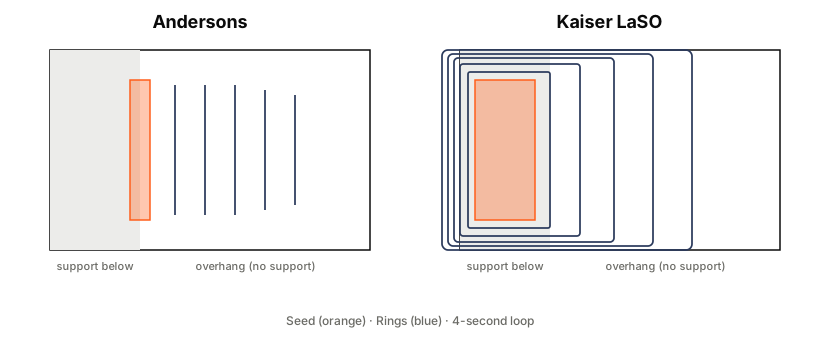
Both algorithms compute a seed geometry at or near the supported edge of the overhang, then propagate rings outward from that seed into the unsupported region. Each new ring bonds to the previous one. The loop ends when the rings can't grow further inside the current layer.
The real differences between the two are what the seed looks like and what each iteration offsets:
| Andersons | Kaiser LaSO | |
|---|---|---|
| Seed | Narrow band along the support-overhang boundary | Full lower-slice polygon shrunk inward by 2 × nozzle (treated as a closed curve) |
| What each iteration offsets | The accumulated filled region | The previous ring (a curve) |
| What an iteration emits | A polyline sampled along the new outline — a wavefront | A closed ring around the previous ring |
| How rings connect | Pattern mode: Smart / Monotonic / ZigZag | Strict lateral offset of the previous ring |
| Loop terminates when | New area growth falls below a threshold (saturation) | The outward offset can't grow further inside the current-layer boundary |
| Flow model | flow_ratio × standard flow (layer-height-dependent) |
Fixed nozzle² mm³/mm (layer-height-independent) |
Neither algorithm grows "inward from the outer wall" — the outer wall of an overhang would have to be printed on air, which is the problem these algorithms exist to solve. Both grow outward from the support.
Andersons
Research origin
Wave-overhang research by Janis A. Andersons (University of Twente), building on Steven McCulloch's arc-overhang work. Original slicer integration in stmcculloch/PrusaSlicer-WaveOverhangs, which is the direct ancestor of our Andersons implementation.
How it iterates
flowchart TD
A[Entry point:<br/>overhang_area + lower_slices + config]
B[Prep seed:<br/>overhang ∩ neighbourhood of lower-slice boundary<br/>expand by seed_expansion]
C[Prep wave_cover_polygons:<br/>the region rings are allowed to live in]
D[Prep trim_boundary:<br/>wave_cover shrunk by line_width/2<br/>keeps extrusion off the outer wall]
E[current_shape = intersection of<br/>offset seed by seed_expansion<br/>with wave_cover_polygons]
F[next_shape = intersection of<br/>offset current_shape by wave_spacing<br/>with wave_cover_polygons]
G{next_shape empty?}
H[Done:<br/>emit accumulated rings<br/>per selected pattern mode]
I[next_area = area of next_shape]
J{new_area > min_area_growth?}
K[Clip next_shape outline to trim_boundary<br/>simplify + reconnect polyline fragments]
L[Push fragments into front_levels stack]
M[current_shape = next_shape]
N[Pattern mode:<br/>Smart / Monotonic / ZigZag<br/>decides inter-ring traversal]
O[Emit as ExtrusionPath with<br/>flow_ratio × standard_flow]
A --> B --> C --> D --> E --> F --> G
G -- yes --> H
G -- no --> I --> J
J -- no --> H
J -- yes --> K --> L --> M --> F
H --> N --> O
Key parameters
wave_overhang_line_spacing— distance between successive wavefrontswave_overhang_flow_ratio— multiplier on standard flow per wave extrusion (layer-height-dependent by nature)wave_overhang_pattern— Smart / Monotonic / ZigZag, affects how rings are traversed after all are generatedwave_overhang_perimeter_overlap— how far waves extend toward the outer wallwave_overhang_minimum_width— split waves at narrow necks narrower than thiswave_overhang_min_new_area— saturation threshold
Source
src/libslic3r/WaveOverhangs/WaveOverhangs.cpp: the algorithm bodysrc/libslic3r/WaveOverhangs/AndersonsGenerator.cpp: pluggable wrapper
Our divergences from stmcculloch's fork
- Added configurable seam modes (Alternating / Aligned / Random) on top of the pattern mode
- Added per-wave cooling overrides (fan speed, nozzle temp, min wave time, min layer time)
- Added
max_iterationssafety cap - Removed unused
PropagationParamsknobs (wavefront_advance,discretization,arc_resolution) that were plumbed but never wired up
Kaiser LaSO
Research origin
Rieks Kaiser's MSc thesis under Andersons' supervision at the University of Twente. Reference Python (CustomSupportInjector.py) is a G-code post-processor that replaces the original overhang-layer perimeters with lateral offset waves.
How it iterates
flowchart TD
A[Entry point:<br/>overhang_area + lower_slices + config]
B[Prep seed:<br/>lower_slices shrunk inward by 2 × nozzle]
C[Densify seed contour to 0.1mm spacing<br/>so buffer arcs stay smooth]
D[Prep boundary:<br/>overhang ∪ lower_local<br/>shrunk inward by r]
E[Prep anchor band:<br/>expand overhang by 1.5 × line_width<br/>intersect with lower_slices]
F[Compute extrusion clip:<br/>overhang ∪ anchor_band]
G[current_shape = intersection of<br/>buffer seed by r/2<br/>with boundary]
H{current_shape empty?}
I[Done]
J[For each ring in current_shape:]
K[Walk vertices<br/>mark on_boundary flag per vertex]
L[Flip ring direction<br/>on odd iterations<br/>boustrophedon]
M[Rotate ring start to<br/>nearest boundary vertex<br/>near previous last_tip]
N[Segment pairs i-1..i:<br/>both on_boundary → travel<br/>else → extrude]
O[Clip each extrude polyline<br/>to the extrusion clip region]
P[Emit ExtrusionPath<br/>mm3/mm = nozzle²<br/>layer-height-independent]
Q[Update last_tip = end of last segment]
R[next_shape = intersection of<br/>offset current_shape by r<br/>healed with 0.001mm buffer<br/>with boundary]
S{Area grew?}
T[current_shape = next_shape]
A --> B --> C --> D --> E --> F --> G --> H
H -- yes --> I
H -- no --> J --> K --> L --> M --> N --> O --> P --> Q --> R --> S
S -- no --> I
S -- yes --> T --> H
Python → C++ mapping
Every step in the flowchart above maps to a specific line in Kaiser's CustomSupportInjector.py:
| Flowchart step | Python line | Python code |
|---|---|---|
| Seed from lower-slice outer wall, shrunk by 2×nozzle | 174 | seedpoly = Polygon(seedshape).buffer(-2*nozzlesize) |
| First ring at r/2 | 403 | bin1, bin2, shape = offsets(seed_curve, r/2) |
| Clip to boundary | 404 | current_shape = shape.intersection(boundary_polygon) |
| Mark on-boundary vertices | 427–434 | if boundary_polygon.boundary.distance(Point(x,y))<1e-6: isOnBoundary[j] = True |
| Direction flip on odd iterations | 440–448 | if i%2==0: ... else: list(reversed(...)) |
| Rotate ring start to closest boundary vertex to last_tip | 455–459 | first_index = closest_point(xlast, ylast, points_filtered, isOnBoundary) |
| Extrude vs travel decision | 473–490 | if (isOnBoundary_filtered[j-1] and isOnBoundary_filtered[j]): # G0 else: # G1 |
| Flow per mm travel = nozzle² / (π/4 · 1.75²) | 56 | Efactor = nozzlesize**2/(0.25*np.pi*1.75**2) |
| Offset previous ring by r | 533 | a,b,next_shape = offsets(coords, r=r) |
| Heal with 0.001mm buffer, clip to boundary | 534 | current_shape = next_shape.buffer(0.001).intersection(boundary_polygon) |
| Loop while current_shape non-empty | 414 | while not current_shape.is_empty and i < 10e4 |
Key parameters
wave_overhang_ring_overlap— fraction by which successive rings overlap (default 0.15 matches Kaiser's reference)wave_overhang_line_width— width of each extruded linewave_overhang_max_iterations— safety cap on ring count
Flow is fixed at nozzle² mm³/mm and doesn't respond to wave_overhang_flow_ratio. This is layer-height-independent by design: at 0.2mm layers that equals ~2× standard extrusion, at 0.12mm (Kaiser's tested layer height) it's ~3.3×. Each ring deposits a consistent volume per mm regardless of how thin the slice is, which is what gives the ring-to-ring bond enough material.
Source
src/libslic3r/WaveOverhangs/KaiserGenerator.cpp: full portsrc/libslic3r/WaveOverhangs/KaiserGenerator.hpp: interface
Our divergences from Kaiser's Python
- Slicer-pipeline integration (Kaiser's Python is a G-code post-processor). We generate rings at slice time and hand them to Orca as ExtrusionPaths; Kaiser reads a pre-sliced G-code and replaces the overhang layer.
- Extrusion clip: overhang + anchor band, instead of the full ring. Kaiser can extrude through the supported region too because his post-processor replaces the original perimeters. We run alongside Orca's normal perimeter generator, so extruding over supported material would double-extrude. Clipping to overhang-only broke the anchor bond; we ended up with
overhang ∪ (expand(overhang, 1.5 × line_width) ∩ lower_slices)which preserves the first-ring anchor while still staying off distant top surfaces. - Multi-overhang handling per layer (Kaiser's Python processes one region at a time with user prompts).
- No pin-support placement. Kaiser's original drops discrete pin-support nubs under the overhang; this fork aims for fully support-free overhangs and uses
support_remaining_areas_after_wave_overhangsinstead.
Which one to pick
Andersons is the battle-tested default — it came from a published-slicer port and handles a wide range of overhang geometries out of the box. Kaiser LaSO is a second angle on the same problem that some people might prefer for highly directional or ridge-like overhangs where strict lateral-offset ring patterns look cleaner than pattern-connected wavefronts.
Try both on your model and upload the results to waveoverhangs.com so other people can see what actually worked for your setup.